Applies to: vehicles with multi-function steering wheel plus
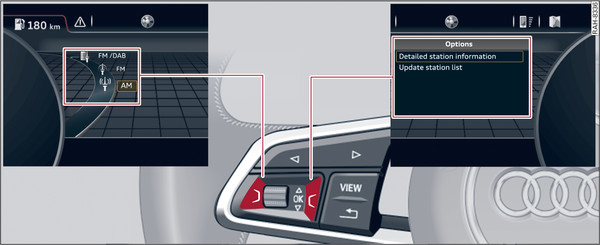
- Fig. 8 View of selection menu and options menu
Left control button
- To call up/close the selection menu: Press the left control button Fig. 8► on the steering wheel. You can use the left thumbwheel to select and confirm a function in the selection menu (e.g. to select a new waveband).
Right control button
- To call up/close the options menu: Press the right control button Fig. 8► on the steering wheel. You can use the left thumbwheel in the options menu to select context-sensitive functions or change certain settings (e.g. extended programme information).
Note
Whether a selection menu or options menu is available depends on the function you have selected.