Applies to: vehicles with Audi connect (infotainment) and hazard alerts

- Fig. 231 Example: Hazard alerts displayed on the driver information system
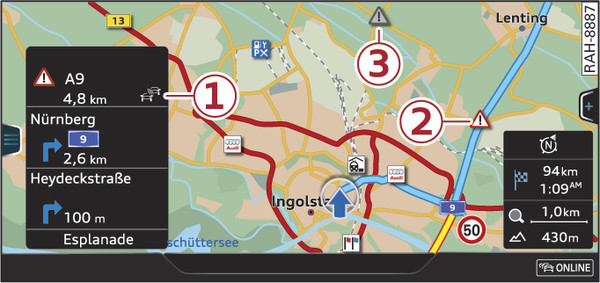
- Fig. 232 Example: Hazard alerts displayed on the map
Hazard alerts which have been registered are displayed on the driver information system Fig. 231► and marked by the symbol -1-. To hide the hazard alerts, press the  button on the multi-function steering wheel.
button on the multi-function steering wheel.Displaying hazard alerts on the map
Press the NAV/MAP button repeatedly until the map is displayed.
Accidents and breakdowns will be displayed on the map Fig. 232►.
When route guidance is active, the hazard alerts on your route are displayed as a coloured traffic sign -2- Fig. 232►. Hazard alerts which are not on your route are displayed as greyed-out traffic signs -3-.
If route guidance is not active, all hazard alerts are displayed as coloured traffic signs.
Display in the online traffic information
Hazard alerts are also shown in the overview of traffic messages Fig. ►.
Press the NAV/MAP button repeatedly until the map is displayed.
Select: left control button > Traffic messages.