Applies to: vehicles with bulbs
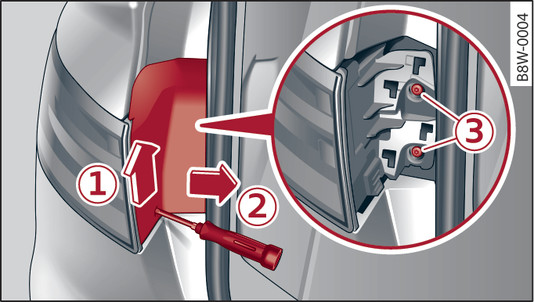
- Fig. 335 Side panel: Removing cover
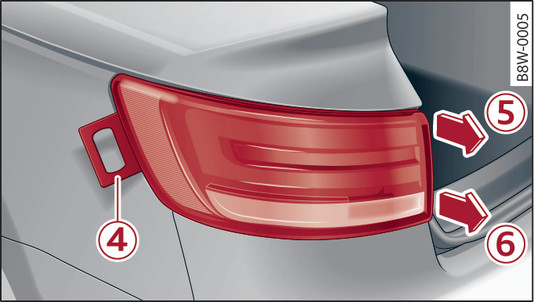
- Fig. 336 Side panel: Removing rear light
Check which of the bulbs is defective.
Switch off the ignition and the lights.
Open the boot lid.
Take the screwdriver, the interchangeable Torx bit and the removal wedge out of the vehicle tool kit link►.
Release the cover by levering the screwdriver upwards -1-. Then push the cover clear to the side with your hand -2-.
Remove the securing screws -3- using the Torx screwdriver.
Carefully slide the removal wedge -4- into the gap between the body and rear light ►.
Gradually ease out the rear light by pulling alternately in direction of arrows -5- and -6-.
Unplug the electrical connector.
Change the defective bulb link►.
Re-install all the parts in the reverse sequence.
Check that the bulb functions correctly.