Applies to: vehicles with multi-function steering wheel plus
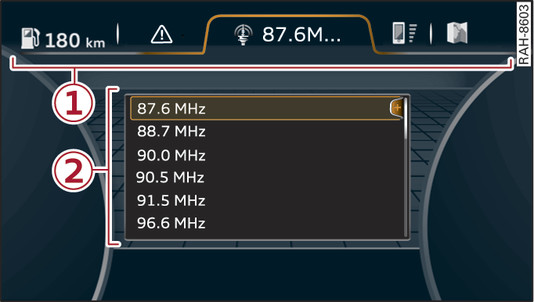
- Fig. 6 View of driver information system
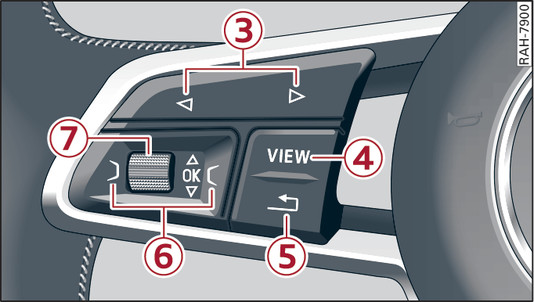
- Fig. 7 Left side of multi-function steering wheel
Important: The ignition must be switched on.
The driver information system shows information -2- in several display tabs -1- Fig. 6►.
The equipment installed on your vehicle determines which of the following tabs are available:
-3- 
 button
button- To switch between tabs: Press the button repeatedly until the desired tab is displayed (e.g. Radio).
-4- VIEW button
To change or reduce the view link►.
-5-  button
buttonTo return to the previous function level.
-6- Control buttons  and
and 
and To call up/close the selection menu or options menu link►.
- To select a function in a menu/list: Scroll the left thumbwheel to the desired function (e.g. setting a frequency).
- To confirm your selection: Press the left thumbwheel -7- Fig. 7►.
- To zoom in/out of the map: When a map is shown on the display, scroll the left thumbwheel to make the map scale larger or smaller.