Applies to: vehicles with MMI touch
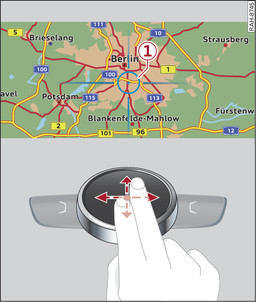
- Fig. 188 Moving the map
Important: A map must be displayed link►.
- To bring up/hide the crosshairs: Press the rotary pushbutton to bring up the crosshairs -1- Fig. 188►. To hide the crosshairs, press the BACK button -7- Fig. ►/Fig. ►.
- To move the standard map/satellite map1): Move two fingers in the desired direction on the MMI touch pad while the crosshairs are displayed Fig. 188►.
- To move the map quickly: Move two fingers in the desired direction on the MMI touch pad quickly while the crosshairs are displayed. The map will only stop moving again after a few seconds.